
"I can turn a regular talking-head video into something that looks way more polished in just a few clicks. It saves me a ton of editing time."

5,600+ videos bg removed
Trusted by 1,626+ creators, marketers and sellers
Remove Video Background In Seconds
Clear, stable, faster results with AI. Less work, more life
or drop a file,
paste video or
MP4, MOV, WEBM
4KUHD Quality
60 MinMax Length
$0.01/sAs Little As
- No watermark
- No software required
- Optimized for TikTok, YouTube, and Instagram content
- Secure uploads and checkout
Real Video Background Removal Examples
Explore before-and-after examples from creator videos, product demos and social media content. See clean results on fine edges, motion and complex scenes - no green screen needed
BeforeAfter
Talking Head Video
BeforeAfter
Product Demo Video
BeforeAfter
Social Media Clip
BeforeAfter
Marketing Video
BeforeAfter
Course Video
BeforeAfter
Personal Branding Video
Output as white / image / transparent background — see how to remove white background from video or change video background
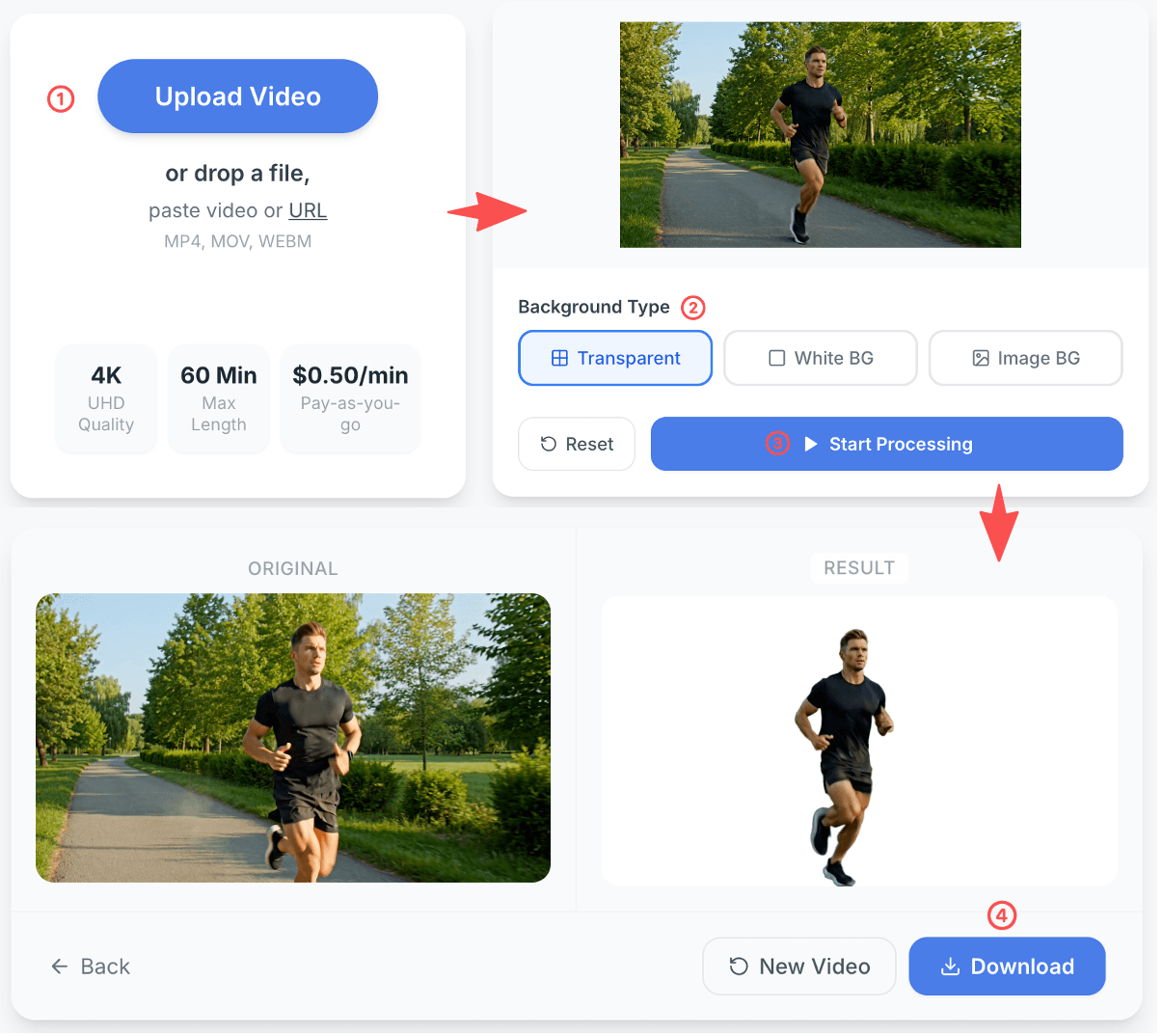
Remove Video Background NowHow to Remove Video Backgrounds in 4 Steps
Upload your video, choose the background you want, let AI process it and download the final result
no masking · no manual editing · no green screen setup
1
Upload video
Add your video and get started in seconds
2
Choose a background
Pick a transparent, white or custom background
3
Remove the background
Let AI remove the original background automatically
4
Download the result
Preview and download your final video - completely watermark-free
Why choose RemoveVideoBG
Get clean video background removal with fast AI processing, flexible export options, and no green screen required
Clean results that look ready to use
Remove backgrounds around hair, hands, and motion with clean edges that look polished and professional.
No green screen required
Create cleaner videos without a studio setup, extra equipment, or complicated editing workflows.
Flexible background options
Export with transparent, white, or custom backgrounds for creator content, product videos, and marketing workflows.
Fast AI workflow
Upload your video, process it in seconds, and download the final result with a simple, easy workflow.
Who is this video background remover for?
Our AI video background remover is built for creators, marketers, sellers, educators and teams that need clean, professional video backgrounds without a green screen
Content Creators
Remove video backgrounds for talking-head videos, short-form content and creator workflows without a green screen.
Marketers
Create cleaner marketing videos, ads and branded content with fast AI video background removal.
E-commerce Sellers
Use video background removal to create cleaner product demos, showcase videos and marketplace content.
Educators
Make course videos, tutorials and training content easier to watch with clean video backgrounds.
Small Businesses
Create professional business videos for websites, social media and promotions without complex editing.
Agencies & Teams
Produce polished client videos and branded content faster with AI background removal at scale.
What users say about our video background remover
See how creators, marketers and sellers use our AI video background remover to save time and create cleaner videos without a green screen
"We use it to clean up raw clips fast. No green screen, no complicated editing — just much better-looking marketing videos."
"It makes our product videos look so much cleaner. Switching to a white or branded background is super easy."
Frequently Asked Questions About Video Background Remover
Everything you need to know before using our video background remover — no green screen, no design skills, no complicated software required
What is a video background remover?
A video background remover is an AI-powered tool that automatically detects and removes the background from any video clip. It isolates the subject — a person, product, or object — so you can replace the background with a transparent layer, solid color, or custom image. This makes it easy to create polished, professional-looking videos without a studio setup.
How do I remove the background from a video?
Just upload your video, select the background style you want — transparent, white, or a custom image — and let the AI process it automatically. Once it's done, download your finished video. No manual masking, no design experience, and no complicated software needed.
Do I need a green screen to remove a video background?
No green screen required. Our AI analyzes the video frame by frame and automatically separates the subject from the background, regardless of what's behind them. You can film in your bedroom, office, or outdoors — the AI handles the rest.
Can it handle hair, hands, and motion blur?
Yes. The AI is designed to handle common edge-case details like fine hair strands, moving hands, and natural motion. It works best with good lighting and a reasonably clear contrast between subject and background. For most talking-head videos, product demos, and social clips, you'll get clean, natural-looking results.
Can I export my video with a transparent background?
Yes. You can download your video with a fully transparent background (alpha channel), which is perfect for compositing, overlaying on other footage, or dropping into presentation slides and design tools. Transparent export gives you maximum flexibility for post-production workflows.
Can I change the background to white or a custom image?
Yes — you can change the background to white, a custom image, or transparent. You can also export a white background video for product pages and marketplaces. See how to change video background online.
What video formats are supported?
You can upload videos in MP4, MOV, and WEBM formats — the most widely used formats across cameras, phones, and screen recorders. Processed videos are exported as MP4 or with a WebM format depending on the output option you choose.
How long does video processing take?
Most videos are processed within a few minutes, depending on the file size, resolution, and length of the clip. A 30-second HD video typically takes under 2 minutes. You'll be notified as soon as your video is ready to download.
Is there a free trial or preview available?
Yes. You can upload a short video clip and preview before committing to a paid plan. Check the pricing page for plan options.
Will my video keep its original audio?
Yes. The background removal process only affects the visual layer of your video. Your original audio track — voiceover, music, ambient sound — is preserved in the final output exactly as it was in the source file.
How long are my uploaded videos stored?
Your videos are not stored on our servers. Files are processed and immediately deleted once your download is ready, ensuring your footage stays completely private. For full details, see our Privacy Policy.
What kinds of videos work best with a video background remover?
Video background removal works best for talking-head videos, product demos, tutorial recordings, social media clips, and marketing content. Videos with clear subjects, consistent lighting, and minimal camera shake tend to produce the sharpest edge results.